Build a dependable baseline
First, make the arm pick and place.
I built the workcell and a scripted controller so the gripper had to lift simulated parts through finger contact. That gave the project a working reference before adding AI.
Independent project · Ubuntu / ROS 2 · 2026
Camera-Guided Robot Arm Sorting
Ask for a component in everyday language. The robot looks at the camera, checks which part you mean, picks it up and places it in a tray. It checks the result before calling the task complete.
A simulated robot working with known red, green and blue parts. Built on Ubuntu and ROS 2; not yet tested on physical hardware.
The workcell in action
Select the right part, grasp it, carry it and check its destination. These recorded tasks show the same camera-guided pipeline working with different components and trays.
Find the red component and place it in the left tray.
Select the green component and carry it to the right tray.
Verify the pickup, then respond to the follow-up destination.
Recorded simulation footage. Clips play independently and use sampled frames; playback is not a real-world speed measurement.
Language meets vision
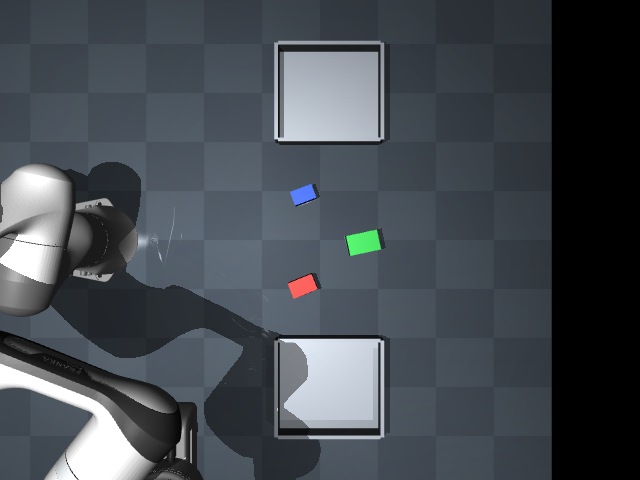
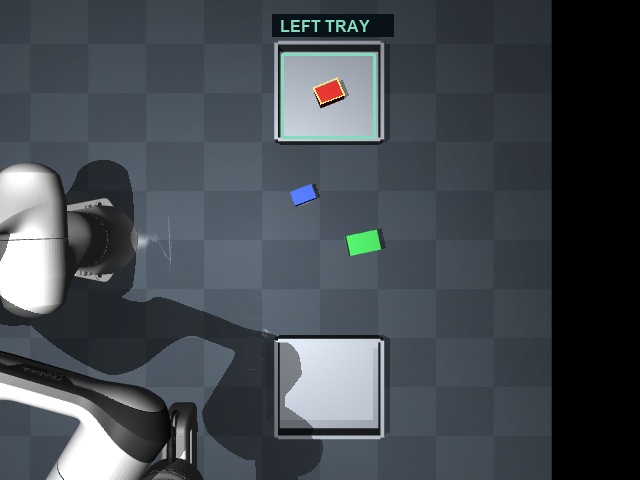
Ask for the red box. The vision-language model selects it in the camera image, then the controller picks it up. Fresh full-camera colour and depth observations check that it is resting inside the left tray.
The VLM selects the part from the initial image. After release, separate vision software uses three fresh colour and depth observations to check that the part fits inside the known tray boundary, rests at the expected height and stays still.
What the final planned tests showed
Ten tests asked the robot to place a part. Five more checked whether it asked for clarification, refused a moved target or stopped while holding a part. All 15 passed in the final planned test set. An earlier set passed 14 of 15 and helped identify a problem with waiting for camera feedback. These are small simulation tests, not a promise of performance on any object.
How the project developed
Build a dependable baseline
I built the workcell and a scripted controller so the gripper had to lift simulated parts through finger contact. That gave the project a working reference before adding AI.
Learn from an approach that failed
A model trained to imitate demonstrations struggled to complete tasks. I kept those failed experiments and changed direction: a learned model now helps calculate robot movement, while feedback checks the arm’s progress.
Connect language to what the camera sees
A vision-language model sees the camera image and request together. Separate checks verify its proposed target, and depth sensing estimates where to grasp. Missing or ambiguous parts lead to clarification.
Handle the moments that go wrong
The software checks the grasp and placement, allows one retry after a missed grasp, and stops when the target moves or feedback fails. Testing exposed waiting and timing problems that shaped the final controller.
What it is ready to show
The project connects an everyday request to a visible, checked robot action. It demonstrates the engineering behind an AI-enabled workcell, from a conventional baseline to camera-guided manipulation.
The scene has three known parts, two fixed trays and a calibrated camera. Arbitrary objects, clutter and a physical robot need further development and testing. The simulation runs slower than real time, and its Stop button is not a hardware emergency stop.
I developed the workcell, control, perception, learning pipeline, ROS interfaces and evaluation with AI-assisted coding. The Panda robot assets come from Google DeepMind’s MuJoCo Menagerie; Qwen provides the pretrained vision-language model.
Qwen3-VL sees the request and a numbered camera image. Independent colour and geometry checks validate its proposed target, and calibrated RGB-D sensing locates the grasp. An unclear or missing part leads to clarification rather than an arbitrary pick.
A PyTorch model learns the robot’s kinematics from 60,000 synthetic samples. Conventional feedback uses its predicted Jacobian to calculate joint movement. The task sequence and gripper control remain engineered; the vision-language model does not directly drive the joints.
ROS 2 connects the camera, joint feedback, controller and MuJoCo simulation on Ubuntu. Contact, progress and placement checks determine completion. The final planned simulation evaluation passed 10/10 placement cases and 15/15 checks overall, including clarification and stopping behavior.
The scene uses known parts and calibrated simulated sensors. Continuous-operation timing still needs further qualification before broader deployment. Foundations: Python, ROS 2 Humble, MuJoCo, PyTorch, Qwen3-VL and llama.cpp.